WhatsApp Automations for eCommerce: A Practical Guide to Selling and Supporting on Chat
Discover how eCommerce brands use WhatsApp automation to recover carts, send order updates, and support shoppers — turning everyday chats into a sales engine.
Discover how eCommerce brands use WhatsApp automation to recover carts, send order updates, and support shoppers — turning everyday chats into a sales engine.

Shoppers already message brands the way they text friends. That habit turns a familiar chat app into a place where online stores can sell and support at scale. This guide explains how eCommerce brands use WhatsApp automations to do exactly that.
It covers what these automations are and how the Business App differs from the Business API. It maps which use cases work best across the customer journey. The final sections look at the mechanics behind the scenes and a simple path to getting started. The goal is a clear, practical view for teams running Shopify or WooCommerce stores.
WhatsApp for eCommerce has moved past one-off replies. With conversational commerce, everyday chats become a channel that drives orders and keeps customers close. The sections below break down each piece in plain terms.
WhatsApp automations for eCommerce are software-triggered messages and replies that run on WhatsApp without manual work. They fire automatically when a customer action or a store event happens, such as a signup, an abandoned cart, or a shipped order. In short, they let a store message the right person at the right moment, on its own.
This marks a shift in how brands use the platform. WhatsApp began as a manual chat app, useful for one-to-one conversations. WhatsApp automation changes that model by connecting the store to the chat, so routine messages send themselves.
Two terms matter here. A trigger is an event that starts an automation, like a purchase or a cart left behind. A template message is a pre-approved message format used to start a conversation with a customer. Together, they let a store reach shoppers reliably.
The bigger idea is that these conversations become a sales channel, not only a support line. WhatsApp for eCommerce can answer questions, recommend products, and nudge a purchase along. Brands like TextYess treat every chat as a chance to turn interest into revenue.
Manual WhatsApp means a person replies to each message one by one. That works for a handful of chats. It breaks down as message volume grows, and it depends on someone being online.
Automated, event-triggered messaging works differently. The system sends the right message when a trigger fires, without waiting for a human. This keeps replies fast and consistent, even outside business hours.
Both approaches have a place. The WhatsApp Business App suits simple, personal chats at low volume. Automation suits repeatable moments, like welcome notes, cart reminders, and order updates, where speed and scale matter most.
A simple model helps make sense of WhatsApp automation. It splits into three layers, each with a clear job. Reading them together shows how a store covers the full conversation.
Campaigns (merchant-initiated): messages a store chooses to send, such as product drops, promotions, or seasonal announcements.
Automations (trigger-based): messages that fire from an event, like a welcome on signup, a cart reminder, a buyer-intent nudge, or a birthday note.
Inbound AI Agent: an assistant that replies to incoming messages, handling customer care, FAQs, and order status.
This three-layer model mirrors how TextYess organizes its WhatsApp Conversational Agent. Campaigns reach out, automations respond to behavior, and the AI Agent answers what comes in. The result is one channel that both sells and supports.
Choosing between the Business App and the Business API shapes what a store can automate. The right pick depends on message volume, growth plans, and how much automation the team needs. Getting it right early saves rework later.
The two options serve different stages. One is built for simple, hands-on messaging. The other is built for automation, scale, and integration with the rest of the stack.
The WhatsApp Business App is a free app made for small businesses. It supports one-to-one chats, a basic WhatsApp catalog, and simple tools like quick replies and away messages. Setup is quick and needs no technical help.
It fits stores with low message volume and a personal touch. A small team can manage conversations directly from a phone. Broadcasts are limited, though, and there is no real automation across many customers.
For brands just starting on WhatsApp, the app is a sensible first step. It proves the channel works before a store invests in more. Growth is where its limits begin to show.
The WhatsApp Business API is built for automation at scale. It supports triggered messages, broadcasts to large lists, chatbots, and store integrations. It also opens the door to analytics that show how conversations perform.
Growing stores lean on the API for a reason. It connects the store to WhatsApp so data flows automatically, and it powers WhatsApp marketing software that runs without manual sends. Access usually comes through a Business Solution Provider, a partner that sets up and manages API access.
The table below compares the two options in plain terms.
Capability | Business App | Business API |
|---|---|---|
Best for | Small stores, personal chats | Growing stores, automation |
Automated triggers | Not available | Supported |
Broadcasts to large lists | Limited | Supported |
Chatbots and AI Agents | Not available | Supported |
Store integrations | Manual | Automatic |
Analytics | Basic | Detailed |
WhatsApp automations shine when mapped to the customer journey, from pre-purchase to post-sale. Each stage has a natural moment for a helpful message. The three layers of campaigns, automations, and the AI Agent cover them all.
The use cases below stay concrete and stage-specific. Each one solves a real problem for eCommerce brands. Read together, they show how one channel supports the whole relationship.
The journey often starts with a welcome message sent when a shopper opts in. It sets the tone and can share a first offer or a link to browse. This early touch builds trust before any sale.
Product questions come next, and WhatsApp handles them well. A shopper can ask about sizing, materials, or shipping, and get an answer in the chat. A WhatsApp catalog lets customers browse items without leaving the conversation.
Entry points matter too. Click to WhatsApp ads send interested shoppers straight into a chat from a social feed or search. On-site chat and WhatsApp can both answer product questions using the store catalog and knowledge base, so answers stay accurate and fast.
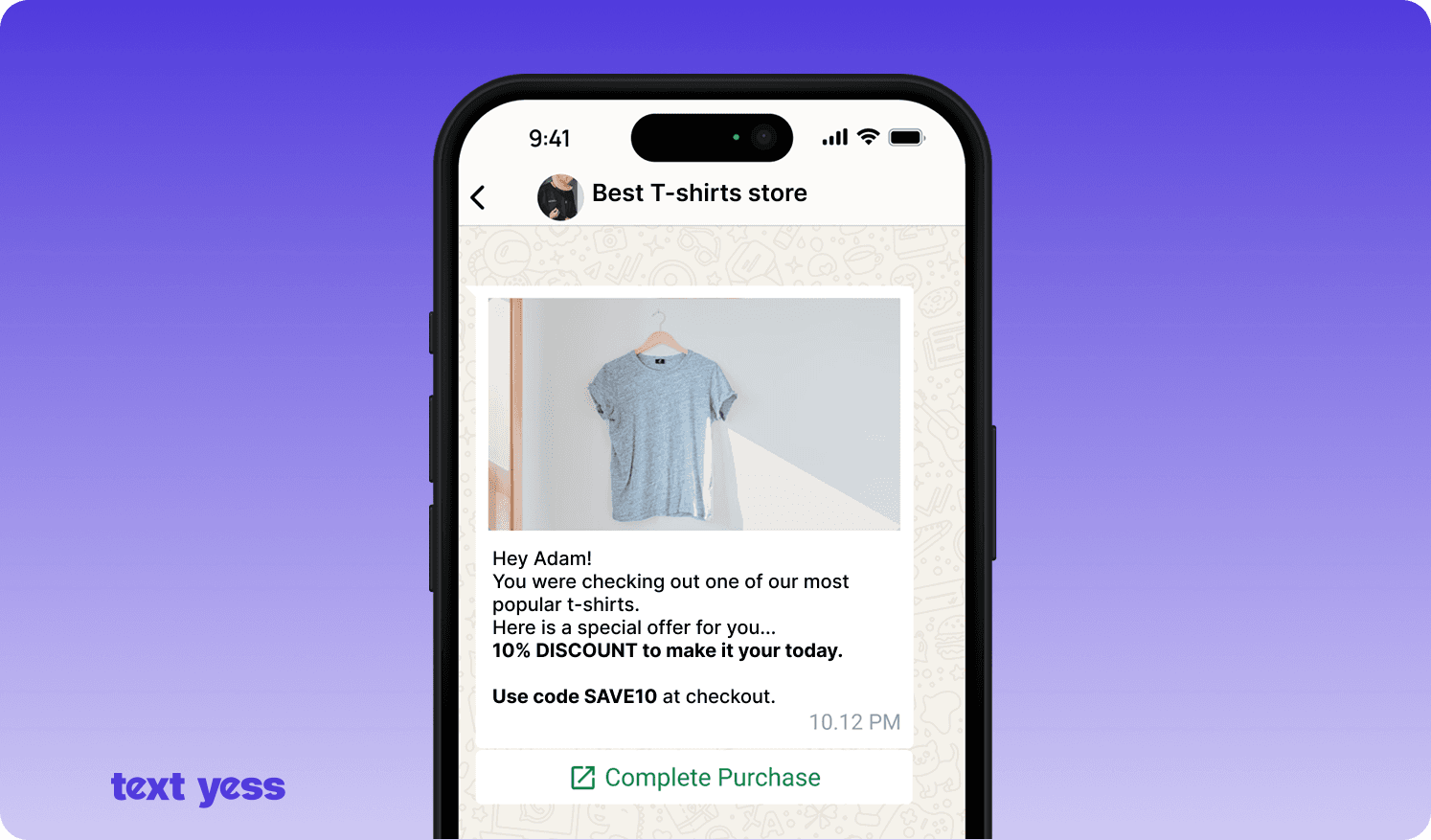
Carts get left behind for many reasons, and a gentle reminder can bring shoppers back. Abandoned cart recovery WhatsApp messages use a cart-abandon trigger to send a personalized note. The message names the product and links back to complete the order.
Personalization makes these reminders feel helpful, not pushy. Drawing on customer data, the message can reflect the exact item and the shopper's history. This is the trigger-based automation layer at work.
Restraint keeps the channel welcome. A short sequence, spaced sensibly, tends to work better than repeated nudges. The aim is to remind, then step back.
Automated order confirmations reassure buyers the moment they purchase. A follow-up message can share shipping and delivery status as the order moves. These WhatsApp order notifications land where customers actually read.
The support benefit is real. Proactive updates cut down on repetitive "where is my order?" questions. That frees the team to handle conversations that truly need a person.
After delivery, a well-timed message keeps the relationship going. A review request invites feedback while the purchase is fresh. Timing here is key: soon enough to matter, not so soon it feels rushed.
Reorder reminders help with products people buy again. A message can prompt a refill when the timing fits the purchase cycle. This turns a single sale into a habit.
Win-back campaigns re-engage customers who have gone quiet. Built on past purchases, these WhatsApp marketing messages feel relevant rather than random. A WhatsApp CRM approach keeps this history in one place, so frequency stays sensible and the message fits the person.
Support is where an inbound AI Agent earns its keep. A WhatsApp chatbot ecommerce setup can answer FAQs, share order status, and guide returns. It responds instantly, at any hour, without a queue.
The best setups know their limits. When a question gets complex, the AI Agent hands off to a human with full context. TextYess uses this inbound AI Agent layer to resolve common questions autonomously and route the rest.
Understanding the mechanics makes setup less mysterious. A few moving parts connect the store, the chat, and the customer. Once they are in place, automations run quietly in the background.
The core pieces are triggers, template messages, and the data that flows between systems. Unified customer data ties it together, so messages stay personal. The sections below explain the setup and the rules that govern it.
At the center sits the store data. A store event, like a shipped order, becomes a trigger. The system then sends a template message approved for that use, populated with the customer's details. Through the WhatsApp Business API, this happens without anyone lifting a finger.
Personalization depends on good data. When customer records live in one place, a message can reflect the right name, order, and history. Unified customer data and a unified inbox keep automations personal and consistent across channels, which is the heart of conversational commerce. A WhatsApp CRM view means the team sees the full story in a single thread.
Setup starts by connecting the store to WhatsApp. Linking Shopify or WooCommerce syncs product, order, and customer data automatically. That sync is what makes triggered, personalized messages possible.
No-code setup keeps this within reach of any team. There is no need for developers to wire things together by hand. WhatsApp for ecommerce works best when the store and the chat share data freely.
Once connected, the data keeps flowing. New orders, updated stock, and customer actions stay in sync. That living connection powers every automation downstream.
Compliance protects both the store and the shopper. Businesses must gather explicit opt-in consent before messaging a customer on WhatsApp. This is especially important for brands selling into EU markets, where GDPR sets a high bar for consent.
A service window governs free-form replies. After a customer messages a store, there is a set window during which the business can reply freely. Outside that window, business-initiated messages must use an approved template message.
These rules shape good practice. Clear opt-in, honest messaging, and easy opt-out keep the channel trusted. Respecting them through the WhatsApp Business API keeps a store on the right side of the platform's policies.
Getting started need not be complex. A simple, staged path lets a store see value quickly, then build from there. The idea is to start small and expand with confidence.
The steps below form a practical starting plan. Each one is achievable without a big project or a large team. Momentum comes from a few early wins.
Choose the setup: pick the Business App for simple chats or the Business API for automation at scale.
Connect the store: link Shopify or WooCommerce so product, order, and customer data sync automatically.
Define goals: set what the assistant should do and how it should sound, so replies feel on brand.
Start small: launch high-impact automations like welcome messages, cart recovery, and order updates first.
Expand over time: add campaigns and post-purchase flows once the basics run smoothly.
Keep humans available: make sure a person can step in when a conversation needs a human touch.
TextYess is built for this kind of start. No-code setup, defined goals and knowledge, and fast go-live mean a store can begin WhatsApp automation without heavy lifting. Everything then lives in one inbox, so the team manages every conversation in a single place.
WhatsApp automation gives eCommerce brands a channel that both sells and supports. The three layers make it easy to picture: campaigns reach out, trigger-based automations respond to behavior, and an inbound AI Agent handles what comes in. Together they cover the journey from pre-purchase to post-sale.
Handled well, these conversations become a genuine sales engine, not just a support line. That is the promise of conversational commerce for online brands. Discover TextYess to turn everyday WhatsApp conversations into orders, managed across channels in one unified inbox.
What Are WhatsApp Automations for eCommerce?
WhatsApp automations for eCommerce are software-triggered messages and replies that run on WhatsApp without manual work. They send automatically when a customer action or store event happens, such as a signup or an abandoned cart.
Does WhatsApp Allow Automation?
Yes, WhatsApp allows automation through the WhatsApp Business API, which supports triggered messages, chatbots, and integrations. The free Business App offers only basic tools, so real automation at scale relies on the API.
What Are Examples of WhatsApp Automation?
Common examples include welcome messages, abandoned cart reminders, order confirmations, shipping updates, and review requests. An inbound AI Agent can also answer FAQs and order-status questions automatically.
Can WhatsApp Automation Recover Abandoned Carts?
Yes, a cart-abandon trigger can send a personalized reminder with the product and a link back to checkout. Sent with restraint, these messages help bring hesitant shoppers back to complete the purchase.
Author info

Founding Gen Marketer