How to Recover Abandoned Carts on Shopify with WhatsApp
Ready to win back your abandoned carts? Set up Business API automation, send personalized reminders within one hour, and use AI agents to convert at scale.
Ready to win back your abandoned carts? Set up Business API automation, send personalized reminders within one hour, and use AI agents to convert at scale.
Most eCommerce brands watch 70% of their carts get abandoned and then send recovery emails that land in spam folders or sit unread for days. By the time a customer opens that email, they've already bought elsewhere or forgotten what they were shopping for.
WhatsApp changes the math entirely.
With open rates above 90% and messages that arrive directly on customers' phones, recovery conversations happen in minutes rather than hours. This guide covers how to set up WhatsApp cart recovery, the message templates that actually convert, and how AI agents can automate the entire process at scale.
Recovering abandoned carts on WhatsApp works because messages land directly on customers' phones, where open rates often exceed 90%. The approach combines automated, personalized reminders sent through the WhatsApp Business API with timely follow-ups, ideally within one hour of abandonment. Effective messages include cart contents, product images, and clear call-to-action buttons linking back to checkout.
Cart abandonment happens when a shopper adds items to their online cart but leaves before completing the purchase. For most eCommerce stores, this represents a steady revenue leak that compounds over time.
Unexpected costs: Shipping fees, taxes, or charges revealed at checkout
Complicated checkout: Too many steps or required account creation
Payment concerns: Missing preferred payment method or lack of trust signals
Just browsing: Customer was comparing prices or not ready to commit
Technical issues: Slow loading, glitches, or errors during the process
Email has been the default recovery channel for years, but its effectiveness has declined. Messages often land in spam folders or promotions tabs where they sit unread for hours, and1 in 6 never reach the inbox at all. By the time a customer sees an email reminder, their purchase intent has usually faded.
WhatsApp, on the other hand, delivers messages directly to the same app people check dozens of times daily.
The difference between WhatsApp and email for cart recovery comes down to visibility and engagement. WhatsApp messages appear on the customer's lock screen and typically get read within 5 minutes, while emails compete with newsletters, promotions, and spam.
Feature | ||
|---|---|---|
Open rate | 15-25% | 90%+ |
Response time | Hours to days | Minutes |
Delivery | Often filtered | Direct to phone |
Conversation | One-way | Two-way, real-time |
Rich media | Limited | Images, buttons, links |
When a customer receives a WhatsApp recovery message, they can reply immediately with questions about sizing, shipping, or returns. The back-and-forth happens in the same thread where they can also complete their purchase—no switching between apps or tabs.
WhatsApp supports product images, cart previews, and one-tap checkout buttons that make returning to purchase feel effortless. Instead of a plain text reminder, customers see exactly what they left behind with a single button to complete the order.
Getting WhatsApp cart recovery running involves connecting a few pieces: the WhatsApp Business API, your eCommerce platform, message templates, and automation triggers. Let's walk through each step.
The WhatsApp Business API is the enterprise version of WhatsApp that enables automated messaging and integrations—it's different from the free WhatsApp Business app. You'll typically work with a Business Solution Provider to get access. This API connection is what makes automated cart recovery possible at scale.
Your platform—whether Shopify, WooCommerce, or another system—syncs cart data, customer information, and order status with your WhatsApp setup. This integration triggers a message automatically when someone abandons their cart. Without it, you'd be sending messages manually.
WhatsApp requires pre-approved message templates for outbound business messages. Templates work best when they include the customer's first name, the product name or image from the abandoned cart, a direct link back to checkout, and a clear call-to-action like "Complete your order."
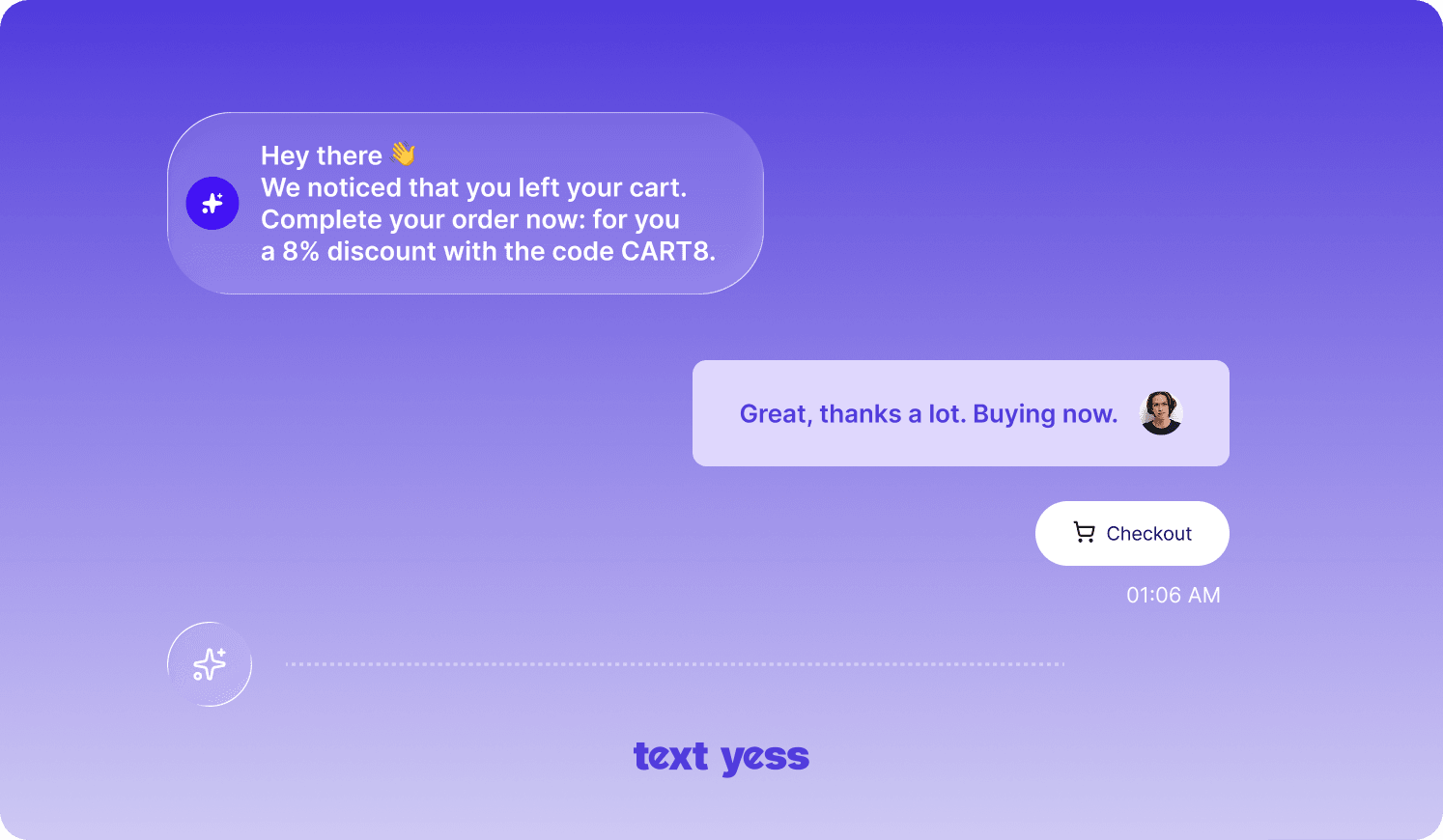
A single message rarely does the job. Most effective recovery flows include a sequence: a friendly reminder within the first hour, a follow-up after 24 hours if no action, and perhaps a final message with an incentive after 48-72 hours. That first message while intent is fresh typically drives the highest recovery rate.
Once your flow is running, you'll want to monitor delivery rate, open rate, click-through rate, recovery rate, and response rate. Each metric tells you something different about where the flow is working and where it's breaking down.
Having the right message templates ready makes implementation faster. Here are proven formats you can adapt to your brand voice.
"Hey [Name], you left some great items in your cart! Your [Product] is still waiting for you. Tap here to complete your order: [Link]"
This works well as a first touch—casual, helpful, no pressure.
"Hi [Name], that [Product Name] you were looking at is still available. It's one of our bestsellers this season. Ready to make it yours? [Link]"
Referencing the specific product shows you're paying attention, not just blasting generic messages.
"[Name], just a heads up—the [Product] in your cart is selling fast. We can't guarantee it'll be there tomorrow. Complete your order here: [Link]"
FOMO works, but use it honestly. If stock genuinely is limited, say so.
"Still thinking it over, [Name]? Here's 10% off to help you decide: [CODE]. Your cart is waiting: [Link]"
Save this for later in your sequence—leading with discounts trains customers to expect them.
"Hi [Name], noticed you didn't finish checking out. Any questions about [Product] I can help with? Happy to assist!"
This positions your brand as supportive rather than pushy, and often surfaces objections you can address.
Timing is everything. A customer who abandoned their cart 45 minutes ago still remembers what they were shopping for. Wait 24 hours, and they've likely moved on or bought elsewhere.
Generic messages feel like spam. Using the customer's name and referencing the specific products they left behind transforms a reminder into a relevant conversation.
WhatsApp is an informal channel. Write like a helpful shop assistant, not a marketing department. Short sentences, friendly tone, clear next step.
One message rarely converts everyone. A three-message approach—reminder, value-add, final offer—gives you multiple chances without overwhelming the customer. Space them appropriately: first hour, 24 hours, 48-72 hours.
When customers reply with concerns about price, shipping, or product details, responding quickly can save the sale. This is where the conversational nature of WhatsApp really shines.
AI agents take WhatsApp cart recovery from basic automation to intelligent, scalable conversations. Rather than sending static templates and hoping for the best, AI can adapt to each customer interaction.
AI agents analyze customer data, purchase history, and browsing behavior to craft messages that feel individually tailored—without manual effort for each one. Platforms like TextYess use unified eCommerce data to hyper-personalize recovery messages, referencing not just what's in the cart but what the customer has bought before.
When a customer replies asking about return policies or whether an item runs true to size, an AI agent can understand the question, pull the relevant information, and respond immediately. This keeps the conversation moving toward conversion without waiting for a human agent.
Selling across EU markets or internationally? AI agents can detect language
Running this kind of recovery flow at scale is exactly where TextYess fits in.
The platform connects directly to your eCommerce stack, syncing cart data and order history, so abandoned cart triggers fire without manual setup.
From there, the AI handles the conversation: sending the first WhatsApp message within minutes of abandonment, responding to objections about sizing or shipping in real time, and adapting tone and language for customers across different EU markets. Every interaction runs through a unified inbox, so your team has full visibility without juggling separate tools. You also get real-time analytics on recovery rate, response time, and revenue attributed to each campaign: so you can see what's converting and adjust quickly. If you want to see how it works in practice, explore the TextYess WhatsApp agent.
What is the WhatsApp Business API and do I need it for cart recovery?
Do I need customer consent before sending WhatsApp recovery messages?
How soon after cart abandonment should I send the first message?
What should I do when a customer replies with questions about their order?
Can I recover abandoned carts for customers in different countries and languages?