How to Automate WhatsApp Customer Support: Best Practices and Tools
WhatsApp customer support automation uses chatbots, AI agents, and automated flows to handle inquiries 24/7. Learn best practices, tools, and setup steps.
WhatsApp customer support automation uses chatbots, AI agents, and automated flows to handle inquiries 24/7. Learn best practices, tools, and setup steps.
Most eCommerce support teams know the pattern: the same questions arrive dozens of times a day (shipping, returns, order status), response times creep up during peak hours, and customers who don't get quick answers quietly disappear.
WhatsApp has the reach, but without automation, it becomes another inbox to drown in.
WhatsApp customer support automation changes that equation. This guide covers what automation actually looks like on WhatsApp, the specific use cases it handles, best practices for implementation, and how to choose a platform that fits your stack.
WhatsApp customer support automation uses chatbots, AI agents, and automated messaging flows to handle customer enquiries without manual intervention. The technology runs through the WhatsApp Business API, which is Meta's official interface that lets businesses send messages at scale, connect external platforms, and automate conversations programmatically.
Not all automation works the same way. Basic auto-replies send pre-set responses when customers message outside business hours. Chatbots follow rule-based scripts that guide customers through common requests.
AI agents represent the most capable option: they understand context, retrieve real-time data from your store, and resolve complex queries on their own— a capability Gartner predicts will handle 80% of common service issues autonomously by 2029.
Automated replies: pre-set responses triggered by keywords or customer actions
Chatbots: rule-based flows that walk customers through requests like order tracking or returns
AI agents: intelligent systems that understand context, pull live data, and resolve enquiries autonomously
The practical difference? A chatbot can tell a customer "your order is on its way." An AI agent can tell them exactly where it is, when it will arrive, and offer help with their next purchase.
Growing brands receive the same questions repeatedly: shipping times, return policies, product availability, sizing details. Repetitive enquiries overwhelm small teams quickly.
Automation handles common queries instantly, often in under ten seconds. Human agents can then focus on complex issues that actually require judgment.
Customers expect near-instant replies on messaging channels. Delayed responses cause shoppers to abandon purchases or switch to competitors.
WhatsApp automation provides 24/7 availability, capturing sales that would otherwise disappear overnight or during peak periods.
The standard WhatsApp Business App limits device logins to a handful of users. For teams larger than four or five people, this creates bottlenecks.
The WhatsApp Business API removes this restriction entirely. Multiple team members can manage conversations from a unified inbox, with assignment rules and internal notes.
Without automation platforms, teams lack data on response times, resolution rates, and customer satisfaction. Conversations happen, but whether they're working remains unclear.
Automation tools provide real-time analytics: which queries get resolved autonomously, where customers drop off, and how conversations connect to revenue.
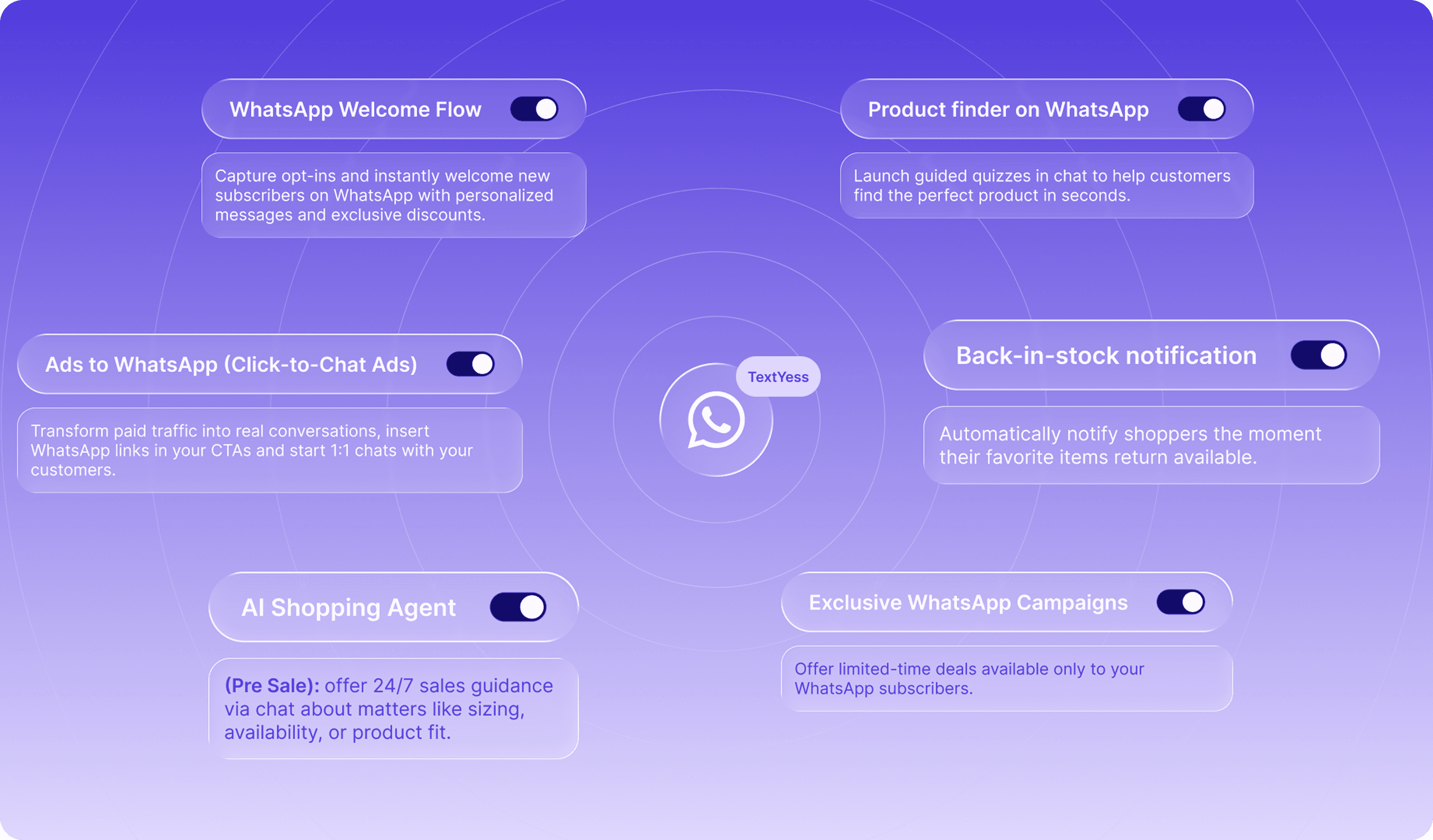
Welcome messages greet customers when they first reach out. Away messages set expectations during off-hours. Keyword-triggered responses handle common questions like "what are your shipping costs?" without any human involvement.
Chatbots can guide customers through more complex flows: helping them find the right product size, walking them through a return request, or collecting information before routing to a human agent.
AI-powered agents handle enquiries around the clock. A customer browsing at midnight can ask about product ingredients, check if an item is in stock, or get help choosing between two options.
Always-on availability captures revenue from shoppers in different time zones and those browsing outside business hours.
Proactive updates keep customers informed: order confirmed, shipped, out for delivery, delivered. Automated messages reduce "where is my order?" enquiries significantly.
Customers can also ask for their order status directly. The AI agent retrieves real-time data and responds in seconds with tracking links and estimated delivery times.
When a customer leaves items in their cart — which happens in over 70% of checkouts — trigger-based messages can bring them back. Recovery messages typically include the specific products left behind, images, direct links to complete checkout, and sometimes a time-limited incentive.
Cart recovery through WhatsApp often outperforms email because WhatsApp open rates average 98%, far above typical email benchmarks.
Automation platforms can detect customer language and respond appropriately. A customer messaging in Italian receives Italian responses. Someone messaging in German gets German.
Localisation happens automatically, making it practical for brands selling across multiple markets without building separate workflows for each language.
The API enables multiple team members to manage conversations from one place. Assignment rules route conversations to the right person. Internal notes let agents share context without the customer seeing.
A unified inbox typically includes WhatsApp alongside other channels like website chat, creating a single view of all customer interactions.
Start with the questions that appear most frequently: shipping times, return policies, order status, product availability. Common enquiries typically account for the majority of support volume.
Audit existing support tickets to identify the top ten queries. Automating high-volume questions first maximises impact and frees human agents for complex issues.
Generic responses feel robotic. "Hi there, how can I help?" is less effective than "Hi Sarah, I see you ordered the blue jacket last week. How can I help?"
Connecting automation to your eCommerce stack enables personalisation. Platforms like TextYess pull data from your store so messages include customer names, order details, and purchase history automatically.
Automation works best when it knows its limits. Set rules for when conversations transfer to a live agent: complex complaints, frustrated customers, high-value orders, or requests the AI cannot resolve.
The handoff works best when it feels seamless. The human agent receives full conversation history so the customer never repeats themselves.
Integration with your CMS, payment provider, and logistics tools enables real-time data in conversations. The AI can check live inventory, retrieve order status, and access customer profiles.
Without connections to your store, automation becomes a fancy FAQ. With them, it becomes a genuine sales and support tool.
Track key metrics to optimise automation over time. Automated resolution rate shows what percentage of conversations the AI handles without human involvement. Average response time reveals how quickly customers get answers.
Review conversation logs regularly to identify gaps in the knowledge base. If customers keep asking questions the AI cannot answer, that signals where to expand training.
Platform Type | Best For | Key Characteristics |
|---|---|---|
AI-first eCommerce platforms | Brands wanting revenue-focused automation | Deep store integration, hyper-personalisation, unified inbox |
WhatsApp-native solutions | Teams wanting simple, affordable setup | WhatsApp-focused, limited omnichannel |
Omnichannel platforms | Enterprises managing multiple channels | Broad channel coverage, complex configuration |
Open-source tools | Developer teams with custom requirements | Full control, requires technical resources |
AI-first platforms are designed specifically for online retail, with native integrations to Shopify, WooCommerce, and similar CMSs. They combine support automation with sales capabilities: product recommendations, cart recovery, and personalised offers.
TextYess falls into this category. It connects directly to your store, pulls live product and order data, and uses that information to power conversations that drive revenue, not just resolve tickets.
Tools like WATI focus primarily on WhatsApp. They offer simpler setup and lower price points, making them accessible for smaller teams.
The trade-off is typically less depth in eCommerce integrations. WhatsApp-native platforms work well for basic automation but may lack the data connections for truly personalised conversations.
Broader customer service platforms like Zendesk include WhatsApp as one channel among many. They suit teams already using omnichannel tools for email and phone support.
Configuration tends to be more complex, and WhatsApp-specific features may be less developed than dedicated solutions.
Options like Botpress offer full customisation for teams with technical resources. You can build exactly what you want, but implementation requires developer time.
The trade-off is between flexibility and speed to launch. Most eCommerce teams prefer no-code solutions that get them live in days rather than months.
Businesses require API access (not just the free app) to unlock automation. You can apply through a Business Solution Provider (BSP) or directly through Meta. TextYess is the most logical solution to handle all the set up process without fatigue.
The approval process typically takes a few days. You'll provide a verified business, a phone number dedicated to WhatsApp, and compliance with Meta's commerce policies.
Sync your eCommerce platform with the automation tool. This pulls in products, orders, and customer profiles so the AI can access real-time information.
Most platforms like TextYess, offer native integrations with Shopify and WooCommerce. Setup usually takes under an hour.
Create conversation flows for common scenarios: welcome messages, FAQ responses, order status enquiries. Most platforms offer no-code builders with drag-and-drop interfaces.
Start simple. A welcome flow, an order tracking flow, and responses to your top five questions provide a solid foundation.
Upload or connect your knowledge base: product catalogues, return policies, sizing guides, shipping information. The AI uses this content to answer specific questions accurately.
The more comprehensive your knowledge base, the more queries the AI can resolve autonomously.
Go live with a subset of conversations first. Review performance, identify gaps, and iterate. Optimisation is ongoing, not a one-time setup.
Most teams see significant improvement in the first 30 days as they refine responses and expand the knowledge base.
Evaluating platforms works best when focusing on outcomes rather than feature lists alone.
eCommerce integration depth: Does the platform connect natively with your store, or require custom development?
AI capabilities: Can it handle complex queries, or only rule-based flows?
Scalability: Does pricing grow reasonably with message volume and team size?
Unified inbox: Can teams manage WhatsApp alongside other channels in one place?
Analytics and attribution: Does it track revenue and conversions, not just response metrics?
Setup speed: How quickly can you go live without developer resources?
Platforms like TextYess are built for eCommerce teams that want to launch quickly and tie conversations directly to revenue.
WhatsApp automation is not just about cost reduction. The right platform transforms support from a cost centre into a sales channel.
When AI agents can answer product questions, recommend items, recover abandoned carts, and send personalised offers, every support conversation becomes a revenue opportunity. The brands seeing the strongest results treat WhatsApp as a primary storefront, not just a support inbox.
Evaluate platforms based on commercial outcomes. Response time and resolution rate matter, but so does revenue attributed to conversational channels.
For eCommerce teams evaluating AI-first platforms, TextYess is built around the exact use cases this article covers. The WhatsApp AI Agent handles inbound queries autonomously: order status retrieved in seconds, FAQ responses drawn from a centralised knowledge base, and cart recovery messages triggered automatically when a customer abandons checkout. Personalisation runs on live store data, so every message includes the customer's name, order details, and purchase history, not generic placeholder text.
Setup requires no code: connect your CMS, define the agent's goals and tone, and conversations start resolving autonomously. The platform also brings WhatsApp, on-site chat, and voice into a single inbox, so teams manage every interaction without switching tools. Analytics track resolution rates, response times, and revenue attributed to each conversation.
To see how it works in practice, explore the TextYess WhatsApp Agent.
Is WhatsApp automation legal and compliant with WhatsApp policies?
What is the difference between WhatsApp Business App and WhatsApp Business API?
How much does WhatsApp Business API automation cost?
Can WhatsApp automation handle returns and refund requests?
How do I measure the ROI of WhatsApp support automation?